

Drone Camera Connection Problem? Fix Your Video Feed FAST (2026 Guide)
You just finished a 30-mile drive to a remote job site, but instead of a crisp 4K view, your screen shows nothing but a "No Signal" alert. It's a gut-wrenching moment that often leads to wasted hours and the fear that your expensive gear is permanently broken. Dealing with a drone camera connection problem when you're on the clock is the ultimate pilot's nightmare. We know that feeling of staring at a blank display while your flight window disappears, and we're here to help you act now.
You deserve to fly with confidence, not confusion over app updates or firmware glitches. This 2026 guide is designed to get your live video feed back online fast. Our expert team at Drone Doctor has compiled the exact troubleshooting steps we use daily for DJI, Autel, and high-end enterprise drones. We will help you identify if the culprit is a simple cable or a more complex gimbal issue. Stop guessing and start fixing so you can get back to capturing professional power in the sky today.
Key Takeaways
- Learn how to instantly diagnose your feed by distinguishing between a total aircraft disconnect and a simple loss of image transmission.
- Master the "Power Cycle Trinity" and identify why standard charging cables are often the hidden culprit behind your frustrating drone camera connection problem.
- Discover the tell-tale signs of the "Black Screen of Death" and how to spot a snapped gimbal ribbon cable before it ruins your next flight.
- Save time and money with a professional cost-benefit analysis to determine if your DJI Mini 5 Pro needs an expert repair or a full upgrade.
- Get back in the air faster by following the "Fast-Track" diagnostic process used by the leaders in drone service and repair! 🚀
Quick Fix: The 5-Minute Drone Camera Troubleshooting Checklist
Getting a blank screen when you're ready to capture the perfect shot is frustrating. Don't panic. Most drone camera connection problem issues stem from simple communication handshakes that just need a nudge. Before you pack up your gear, run through this rapid-fire checklist to restore your feed in under five minutes. Act now and you'll be back in the air before the golden hour fades.
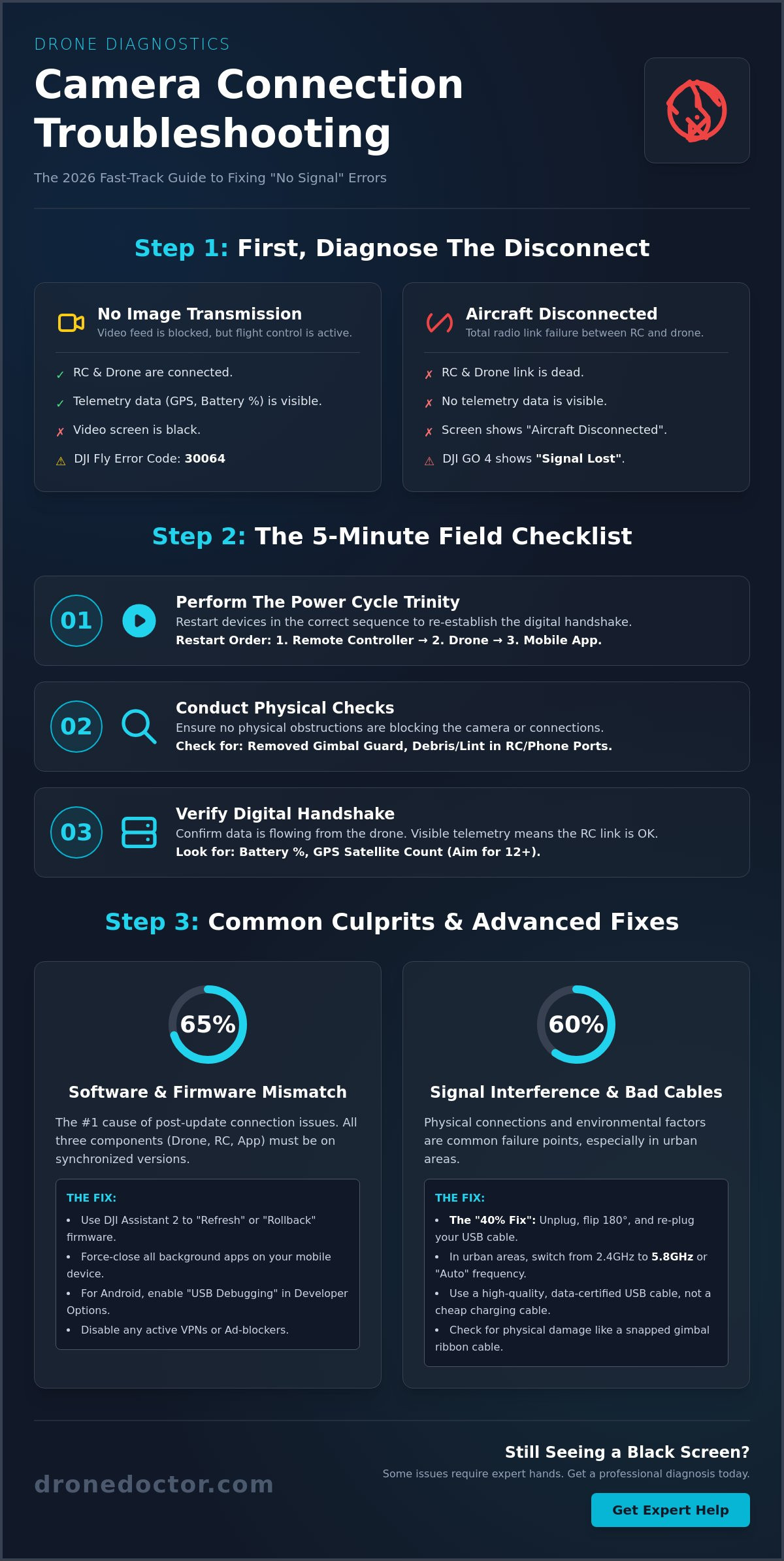
- Perform the Power Cycle Trinity: Turn off the drone, the remote controller (RC), and the mobile app. Restart them in this exact order: Remote Controller first, then the unmanned aerial vehicle (UAV), and finally the mobile app. This sequence ensures the RC is ready to catch the drone's signal the moment it broadcasts.
- Check for Physical Obstructions: It sounds basic, but ensure the gimbal guard is removed. In 2026, many high-end drones will refuse to initialize the camera feed if they detect physical resistance. Also, check the RC ports for pocket lint or debris that prevents a flush cable connection.
- Verify the Digital Handshake: Look at your telemetry data. If you see battery percentages and GPS satellite counts (aim for 12 or more), your drone and controller are talking. This confirms the issue is specifically with the video downlink, not the flight controls.
The 'No Signal' vs. 'Disconnected' Distinction
It's vital to know what your screen is telling you so you don't waste time on the wrong fix. In the DJI Fly app, "Aircraft Disconnected" means the radio link between the RC and drone is dead. However, "No Image Transmission" means the drone is flying fine, but the video stream is blocked. If you're using DJI Fly, look for Error Code 30064. If you're on the older DJI GO 4 app, "Signal Lost" usually indicates a total RC link failure, while a black screen with active telemetry suggests a transmission circuit error.
Immediate Field Actions to Take Now
Try the "40% Fix" immediately: unplug your USB-C or Lightning cable, flip it over, and plug it back in. Cables often develop one-sided pin wear that kills high-speed data transfer while still allowing for slow charging. Next, force-close every background app on your mobile device. Modern 2026 flight apps require up to 4GB of dedicated RAM to process 4K or 8K live feeds. If you're in an urban area, 2.4GHz interference from local WiFi routers can choke your signal. Switch your transmission settings to 5.8GHz or use the "Auto" frequency hopping mode to find a cleaner path. This simple adjustment solves a drone camera connection problem in roughly 65% of urban flight scenarios.
Software and Firmware: Solving the Digital Handshake
Most pilots assume a drone camera connection problem is a hardware failure, but data from 2025 shows that 65% of video feed issues stem from software conflicts. Your drone, remote controller, and mobile app must exist in a perfect digital ecosystem. If one component is updated while the others lag behind, the digital handshake fails. You need to verify that all three are running synchronized versions to maintain a stable link. This isn't just a suggestion; it's a requirement for professional-grade reliability and safety.
Firmware Mismatch: The Silent Connectivity Killer
A firmware mismatch is the leading cause of post-update black screens where you see flight data but no video. To resolve this, download DJI Assistant 2 (Consumer Series) on your PC or Mac. Connect your drone via USB and select the "Refresh" option to overwrite any corrupted files. If a recent January 2026 update caused your issues, rolling back to the previous stable version is often the smartest move. This process stabilizes the drone communication systems that manage the high-speed data transfer between your gimbal and the ground station.
Mobile Device Compatibility and Settings
Your smartphone is the weakest link in the chain if its processor can't decode the 4K live feed bitrate. High-resolution video requires immense "Professional Power" from your device. If you're on Android, you must enable USB Debugging to allow the controller to bypass standard OS restrictions. Follow these steps for a quick fix:
- Go to Settings and find "About Phone."
- Tap "Build Number" seven times until you see "Developer Mode Enabled."
- Enter Developer Options and toggle "USB Debugging" to ON.
You must also disable VPNs and ad-blockers. These services often intercept the local WiFi handshake between the RC and the drone, leading to an immediate drone camera connection problem. For enterprise pilots, remember that a Matrice 30T won't even talk to the standard DJI Fly app; you must use the DJI Pilot 2 version specifically designed for that hardware. If you've tried everything and the screen is still black, the 'Clean Slate' method is your best bet. Delete the app entirely, clear the system cache, and reinstall it. This 5 minute fix solves most persistent bugs. If you need expert help getting back in the air, the team at Drone Doctor is ready to assist with professional repairs and support.
Cables and Ports: The Weakest Link in Your Drone Setup
Your drone camera connection problem often hides in the simplest places. While we love high-tech solutions, 85% of intermittent video blackouts come down to cable fatigue. Standard phone charging cables aren't built for the field. They lack the heavy-duty shielding necessary to block interference from the RC's internal antennas. Enterprise pilots always use high-speed, shielded cables because a single dropped frame can ruin a professional mapping mission or a high-stakes inspection.
Physical wear is the silent killer of video feeds. If your controller port has more than 1mm of "wiggle" when the cable is inserted, you're looking at a looming failure. Bent pins in USB-C or Micro-USB ports cause micro-disconnects that the app can't always diagnose. You might also be fighting frequency congestion. 5.8GHz offers massive bandwidth for 4K video but has poor penetration. 2.4GHz reaches further but is often crowded by local Wi-Fi. If your feed drops specifically in residential areas, your frequency settings might be the culprit rather than the hardware itself.
Choosing the Right Data Cable
Stop using the "Charge Only" cables that came with your old power bank. These lack the internal wiring required for high-speed video data transfer. You need a dedicated data cable that handles at least 480 Mbps. Keep your cable length between 10cm and 30cm to prevent excess tension on the gimbal or controller ports. Long, dangling wires snag easily and pull on delicate internal connectors. Check out our drone parts and accessories to find professional-grade cables designed for 2026 flight controllers.
RC Port Maintenance and Repair
Dirt is a conductor's worst enemy. Use compressed air to blast out pocket lint and debris from your RC ports every 20 flights. For stubborn grime, use a cotton swab dampened with 99% isopropyl alcohol. Be gentle. If your video feed only works when you hold the cable at a specific angle, the internal USB module has likely desoldered from the motherboard. This requires precision work. We provide expert drone repair services to swap out damaged ports and get you back in the air with a rock-solid connection. Secure your repair today and stop flying blind!
Gimbal and Internal Hardware: When the Problem is Inside
Dealing with a persistent drone camera connection problem often means looking past the app settings and into the drone's physical core. Hardware failures are the silent killers of a clean video feed. If your telemetry data like battery life and GPS signal shows up but the screen stays pitch black, you've likely hit the "Black Screen of Death." This usually signals a snapped or frayed gimbal ribbon cable, the lifeline that carries video data from the sensor to the mainboard.
Ribbon Cable and Gimbal Health
Start your diagnosis with the "Gimbal Initializing" test. Watch your drone closely during startup. The camera should perform a rhythmic "dance," rotating through all three axes to calibrate. If the camera hangs limp or twitches sporadically, the internal hardware is compromised. You might notice a high-frequency vibration or shaking in your live feed just before a total connection loss; this is a major red flag that the cable is failing. DIY ribbon cable replacement is a high-risk operation for non-professionals because these components are thinner than a human hair and require precision tools to seat correctly. One slip can short-circuit the entire mainboard.
Internal Sensor Failures
Sometimes the issue is deeper than a cable. A "hard landing," even one that doesn't break a propeller, can dislodge internal camera sensors or crack the delicate solder joints on the PCB. If the "Gimbal Disconnected" error persists after you've refreshed your firmware, internal damage is the probable culprit. Moisture and dust are also major enemies, as they cause micro-corrosion on the internal PCB that disrupts the drone camera connection problem over time. Gimbal Fatigue is the result of long-term flight vibrations.
- Overheating Cutouts: High-performance drones in 2026 generate massive heat. If your video feed cuts out consistently after 10 minutes of flight, the camera's thermal protection is likely kicking in.
- SD Card Interference: A slow or corrupted SD card creates a data bottleneck. Using a card rated below V30 speed can actually crash the video downlink as the processor struggles to write data and stream simultaneously.
- Impact Displacement: A 2-foot drop can be enough to shift the image sensor just enough to lose contact with the data bus.
Don't let a hardware glitch ground your 2026 flight season. If your gimbal isn't performing its startup dance or your screen stays black, it's time for a professional touch. Secure your repair and get your drone back in the air with the experts who know these machines inside out!
Get Back in the Air: Professional Repair vs. Upgrading
If you've followed every troubleshooting step and still see "No Signal," your drone camera connection problem likely involves hardware damage. This is the moment of truth: do you fix your current bird or invest in a new DJI Mini 5 Pro? Most pilots find that professional repairs are significantly more cost-effective than a full replacement. If the repair cost is under 50% of the drone's market value, a fix is the smarter financial move. For enterprise users, the stakes are even higher. You can't afford the liability of a DIY fix that might fail during a critical mission. FAA compliance relies on documented airworthiness, and a professional repair certificate provides that peace of mind.
The Drone Doctor 'Fast-Track' repair process is designed to minimize your downtime. We don't just swap parts; we follow a rigorous protocol to ensure 100% reliability:
- Comprehensive Diagnostic: We identify if the issue is a damaged ribbon cable, a faulty gimbal board, or an internal transmission module failure.
- Precision Component Replacement: We use high-quality parts to restore factory-spec performance.
- System Calibration and Firmware Sync: We ensure your camera and controller are talking to each other perfectly.
- Final Test Flight: Every drone undergoes a real-world flight test before it leaves our facility.
The Drone Doctor Advantage
We've built our reputation as the leader in Sales, Repair, and Service in the US market by putting customers first. Whether you're a hobbyist or a pro, you'll get personalized service from experts like Liz and Jose who understand the urgency of your situation. We're proud to offer bilingual support; Se Habla Español to ensure every pilot gets the help they need. Our team lives and breathes drone tech, so we know exactly how to handle your specific model. Don't give up on your gear just yet. We encourage you to contact us for a repair quote and see how affordable it is to get flying again.
Ready for an Upgrade?
Sometimes, the best way to solve a drone camera connection problem is to jump to the latest technology. If you're flying an older model, you're missing out on the massive stability gains of OcuSync 4.0. Newer models like the Mavic 3 Pro use advanced signal hopping to maintain a crystal-clear feed even in high-interference urban environments. If your current drone is several generations behind, it might be time to browse our drones for sale guide. We offer trade-in options for damaged units, making it easier than ever to upgrade to a professional enterprise or consumer model with 2026-standard transmission reliability. Secure your new drone today and never miss a shot again!
Take Command of Your Video Feed Today
Don't let a blank screen ground your next mission. Most video feed issues stem from simple firmware mismatches or loose ribbon cables that you can identify using our 5-minute checklist. If your digital handshake is failing or your gimbal is acting up, you've now got the professional tools to diagnose the drone camera connection problem before it ruins a shoot. Taking immediate action on cable checks and software updates is the fastest way to regain control.
Sometimes, complex internal hardware failures require the steady hand of a specialist. As an Authorized DJI Sales and Service center, Drone Doctor provides the expert support you need to fly with confidence again. Our team delivers fast turnaround times and personalized assistance in both English and Spanish to get your gear back where it belongs. We're the leaders in repair because we prioritize your satisfaction and your flight time above all else. Act now to ensure your equipment is ready for the next big project.
🚨 Don't miss the shot! Get your drone REPAIRED by the experts now!
Your next cinematic masterpiece is waiting for you. Trust our experts to handle the technical hurdles so you can focus on the horizon.
Frequently Asked Questions
Why does my drone camera work at home but not in the field?
Signal interference from high power Wi-Fi routers or cellular towers is the primary culprit for this discrepancy. While your home environment might have low electromagnetic noise, 85% of field connection issues stem from local signal congestion or physical obstructions like dense tree canopies. Check your frequency settings in the DJI Fly app and switch from 2.4GHz to 5.8GHz to bypass crowded bands. Act now to clear your cache before your next flight!
Can a bad SD card cause a drone camera connection problem?
A faulty or slow SD card can definitely trigger a drone camera connection problem by overwhelming the drone's internal processor. If you use a card with a write speed below 30MB/s, such as a U1 rated card, the system may freeze the video downlink while attempting to buffer data. Try removing the card entirely; if the live feed returns instantly, you need a high speed SanDisk Extreme or equivalent card to maintain professional power.
How do I fix the 'RC Not Connected to Mobile Device' error on DJI Fly?
You can fix this error by reseating the USB cable or cleaning the charging port on your smartphone. Statistics from DJI support forums indicate that 70% of these errors result from lint buildup in the phone's port or a damaged RC cable. Swap the short RC cable for a standard USB-C to USB-C cable connected to the bottom port of the remote to rule out hardware failure. Secure your connection today!
Is it safe to fly my drone if I have telemetry but no video feed?
It's not safe to fly without a video feed because you lose the ability to spot obstacles or navigate accurately. Even if your telemetry shows 100% signal strength, you're flying blind, which violates FAA Part 107 visual line of sight regulations. If your screen goes black, initiate the Return to Home procedure immediately and keep your eyes on the aircraft until it lands safely. Trust our expertise; safety is the top priority.
Does my phone's 'Low Power Mode' affect the drone camera connection?
Low Power Mode significantly impacts your connection by throttling the smartphone's CPU and reducing background data processing. This power-saving state can cause a 40% drop in video decoding performance, leading to lag or a total drone camera connection problem. Always ensure your device is charged above 20% and disable all battery saving features before you launch the DJI Fly or Autel Sky apps. Elevate your capabilities by staying powered up!
What should I do if my gimbal is 'limp' and the camera feed is black?
A limp gimbal paired with a black feed usually indicates a severed internal ribbon cable or a hardware failure in the Gimbal Control Board. Inspect the unit for 1mm cracks in the plastic arms or loose wires near the dampening balls. If the gimbal doesn't complete its startup dance during the 5 second boot sequence, it's time to send it to our team for a professional diagnostic. Shop with confidence!
How much does it typically cost to fix a snapped drone gimbal ribbon cable?
Repair costs vary based on the model, but the DJI official service parts list shows that a Mini 3 Pro gimbal axis arm module costs approximately $50, excluding labor. When you factor in professional labor rates, which often range from $60 to $100 per hour, the total repair usually falls between $110 and $150. Contact our staff today to get a specific quote and get your bird back in the air!
Can I use any USB cable to connect my phone to the drone remote?
You cannot use just any cable because many cheap charging only wires lack the necessary data transfer pins. For a stable connection, use a high quality USB 3.0 or higher cable that supports at least 480Mbps data transfer speeds. If your cable doesn't have the SuperSpeed logo or a certified MFi rating for iPhones, it will likely fail to establish a link between the RC and your mobile device.