

How to Prevent Drone Flyaways: The Ultimate Pilot’s Safety Guide (2026)
What if your $2,000 investment isn't actually under your control, even when your hands are firmly on the sticks? It is a terrifying thought that haunts every pilot, especially when you are pushing the limits of a long-distance flight. You have likely felt that sudden spike of adrenaline when your aircraft drifts unexpectedly or hesitates to respond to your input. We understand that anxiety. Most pilots worry that a flyaway is a random, unstoppable glitch, but the truth is that these incidents are almost always predictable sensor conflicts that you can neutralize. Learning how to prevent drone flyaways is the single most important skill you can develop to protect your gear and your peace of mind.
This guide will transform your flight experience by giving you total confidence in your safety protocols. You will master the technical checks required for the latest hardware, including critical updates like the DJI Mavic 4 Pro v01.00.0700 and the DJI Fly App v1.21.2. We are going to dive deep into RTH logic, sensor calibration secrets, and the emergency override commands that every professional must know. By the end of this article, you will have a "Manual First" mindset and the expert knowledge needed to keep your drone exactly where it belongs: under your command.
Key Takeaways
- Understand how "Sensor Conflict" between GPS and Compass data triggers a flyaway so you can react before losing control of your aircraft.
- Execute a foolproof pre-flight routine using 2026 firmware standards and precise IMU calibrations to ensure maximum hardware reliability.
- Master the critical emergency maneuvers on how to prevent drone flyaways, including the instant switch to ATTI mode and telemetry-based navigation.
- Identify high-risk "Invisible Walls" and magnetic interference from concrete rebar or power lines before they compromise your flight path.
- Learn why professional sensor tuning and ESC health checks provide a level of flight stability that basic app calibrations simply cannot match.
What is a Drone Flyaway? The Science Behind Sensor Failure
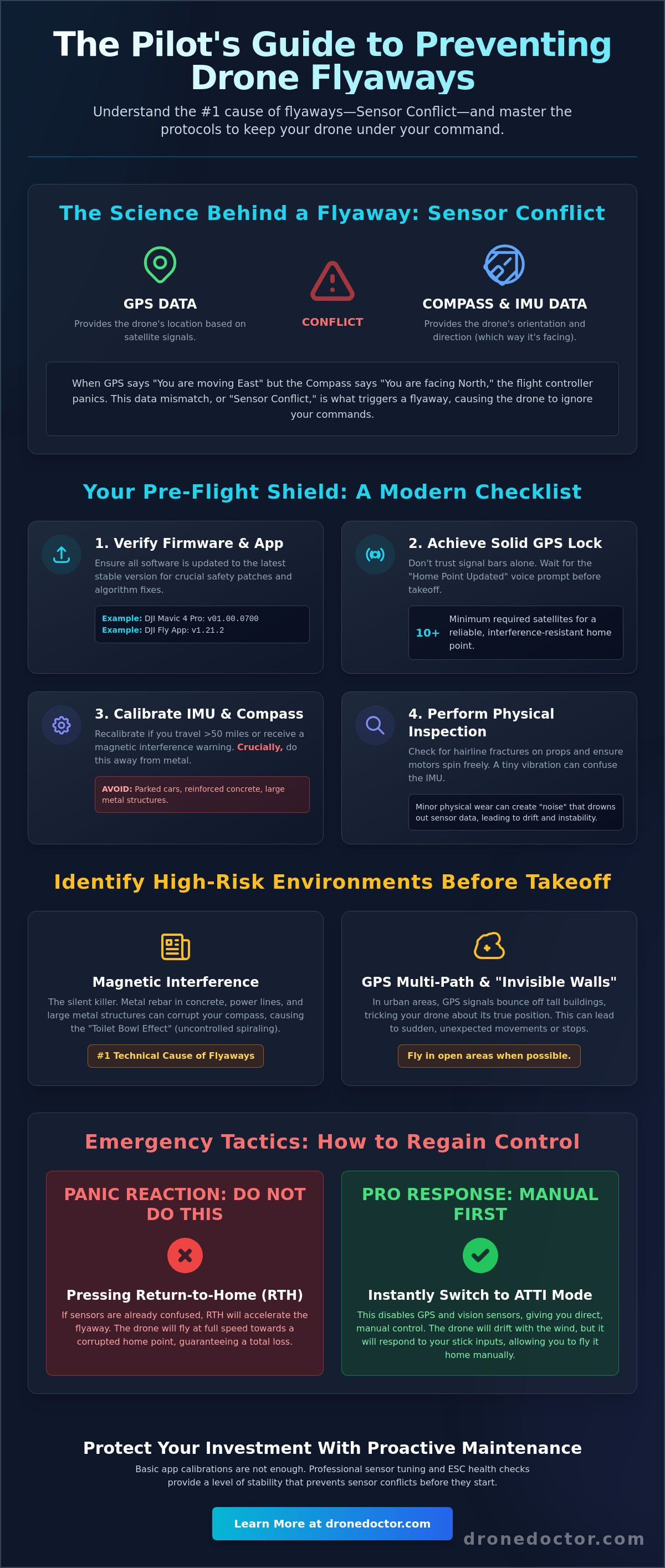
A drone flyaway happens when your Unmanned aerial vehicle (UAV) ignores your stick inputs because its internal sensors are fighting each other. It isn't a random ghost in the machine. It's a calculated response to bad data. When your flight controller receives conflicting information from the GPS and the Compass, it defaults to a logic loop that can send your $2,000 investment over the horizon. Understanding this "Sensor Conflict" is the first step in learning how to prevent drone flyaways. Unlike manual FPV systems that rely entirely on pilot skill, consumer and enterprise drones use complex sensor fusion. This makes them easier to fly but more prone to these specific technical failures when the environment turns hostile.
The Inertial Measurement Unit (IMU) acts as the drone's inner ear. It uses gyroscopes and accelerometers to maintain level flight and stable hovering. If the IMU drifts or fails, the drone loses its sense of "up" and starts to tilt or drift. Things get even more dangerous when pilots panic and hit the Return to Home (RTH) button. If your sensors are already confused, RTH doesn't save the drone; it often accelerates the error. The craft may try to fly at full speed toward a corrupted coordinate, making a bad situation much worse. To stay safe, you must adopt a "Manual First" mindset. If the sensors fail, you are the only thing that can bring that aircraft home.
The GPS Fallacy: Why Bars Don’t Always Mean Safety
Don't trust the signal bars on your screen blindly. In 2026, urban density makes multi-path interference a constant threat. This happens when GPS signals bounce off concrete and glass, tricking your drone into thinking it's several meters away from its actual position. You need at least 10 satellites for a reliable lock before takeoff. Just because you have a signal doesn't mean you have a recorded home point. Always wait for the "Home Point Updated" voice prompt before you punch the throttle. Relying on a weak lock is a recipe for disaster.
Compass vs. IMU: The Internal Tug-of-War
Magnetic interference is the silent killer of drones. When you take off from a reinforced concrete sidewalk, the rebar underneath creates a massive magnetic signature. This confuses the compass, leading to the "Toilet Bowl Effect." This is when the drone flies in widening circles as it tries to correct a position it doesn't actually understand. We define "Compass Bias" as the #1 technical cause of flyaways. It's a fundamental disagreement between where the drone thinks it's facing and where the GPS says it's moving. Mastering how to prevent drone flyaways requires you to recognize this spiral early and kill the automated flight modes before the drone gains too much momentum.
Essential Pre-Flight Checklist: Calibrating for Total Control
Stop treating your pre-flight routine like a suggestion. It is your primary shield against total loss. In 2026, software complexity has reached a point where skipping a single update can leave your aircraft vulnerable to critical logic errors. Before you even power on the motors, verify that you are running the latest firmware. For example, the DJI Mavic 4 Pro should be on v01.00.0700, and your DJI Fly App must be at v1.21.2 to ensure the newest safety patches are active. These updates aren't just for new features. They often contain vital fixes for sensor fusion algorithms that dictate how to prevent drone flyaways in high-interference zones. Following FAA drone safety guidelines helps you stay compliant, but these technical checks are what keep your gear in the air.
Calibration is your next line of defense. You should calibrate your IMU and compass whenever you travel more than 50 miles from your last flight location or if the app throws a magnetic interference warning. However, never calibrate your compass near large metal objects, reinforced concrete, or parked cars. This introduces the very bias you are trying to eliminate. Mechanical stability is equally vital. Inspect your propellers for hairline fractures and ensure your motors spin freely without grit. A vibrating motor can "noise out" the IMU, causing the flight controller to lose its sense of orientation. If you notice any physical wear that calibration can't fix, it might be time to browse the latest drones for sale to ensure you are flying with the most reliable hardware available.
Configuring Failsafe Behaviors
Your failsafe settings determine what happens when the signal cuts out. Don't just leave it on the factory default. If you are flying in an open field, "Return to Home" (RTH) is usually best. If you are under a thick tree canopy, "Hover" might save your drone from climbing straight into a branch. Always set your RTH altitude at least 50 feet higher than the tallest obstacle in the area. If you are filming from a moving boat, enable "Dynamic Home Point" so the drone returns to the controller's current location rather than the middle of the lake where you took off.
Hardware Inspection for Enterprise and Consumer Models
Enterprise pilots using Matrice systems must pay extra attention to the external GPS puck. Physical damage to this component can lead to intermittent signal loss that a DJI Mini series pilot might never encounter. While consumer drones are more "all-in-one," they are prone to battery voltage drops. A sudden dip in power can trigger a mid-air logic reset, forcing the drone into an uncontrolled state. If your batteries show any signs of swelling, replace them immediately with high-quality drone parts to maintain a stable power curve throughout your flight.
Identifying High-Risk Environments: Magnetic Interference & Signal Blocks
Don’t let a clear sky fool you. High-risk environments are often invisible to the naked eye. Signal attenuation from concrete structures and specialized glass coatings can create "Invisible Walls" that swallow your control link without warning. This is especially true in urban canyons where multi-path interference is amplified by the sheer volume of reflective surfaces. Learning how to prevent drone flyaways in these settings requires a deep understanding of how local geography and solar activity interact with your hardware. If you are flying between skyscrapers or near massive industrial complexes, you are operating in a signal minefield.
Solar flares are another hidden threat that many pilots overlook. The KP Index measures geomagnetic disruption caused by solar activity on a scale of 0 to 9. When the KP Index hits 5 or higher, GPS accuracy can drop significantly. This leads to "positional drift" even if your remote shows a high satellite count. Before you power up, check a reliable space weather app. If the index is peaking, stay on the ground. It’s better to delay a shoot than to watch your drone drift away because it can no longer calculate its own coordinates due to atmospheric interference.
Magnetic Interference: The Silent Pilot Killer
Launching from a reinforced concrete pad is a recipe for disaster. The rebar inside the concrete acts as a massive magnet, instantly corrupting your compass data before the props even spin. Always use your controller’s "Signal Map" or interference meter to scan the area before take-off. If you see a "Compass Error" or "ESC Status" alert, do not ignore it. Move your launch point at least 20 feet away from metal structures, power lines, or car roofs. For more expert tips on preventing flyaways, you should study how different materials affect radio frequency propagation in your specific flight path.
Weather and Atmospheric Conditions
Wind shear at high altitudes can be double what you feel at ground level. Your drone might hover perfectly at 10 feet, but at 400 feet, it could be fighting a 30mph headwind it simply cannot beat. Cold weather adds another layer of risk by causing sudden battery voltage drops. This can trigger a mid-air logic reset, forcing the flight controller into an emergency landing or an uncontrolled drift. Always keep your batteries in a warm environment until the moment of flight. Remember, the "Line of Sight" rule isn't just a regulation. It is your final failsafe. If you can't see the aircraft, you can't manually override a sensor-driven error before it's too late.
Emergency Tactics: How to Regain Control During a Flyaway
Act fast. When your aircraft starts drifting toward a treeline despite your best efforts, panic is your greatest liability. While manufacturers often suggest hitting the Return to Home (RTH) button, this can be a fatal mistake if your sensors are already compromised. If you want to know how to prevent drone flyaways from turning into total losses, you must be prepared to take manual command in a split second. Use these high-intensity tactics to regain control before your investment disappears. If the worst happens and your aircraft sustains damage during a recovery attempt, our team provides expert drone repair services to get you back in the air quickly.
- Step 1: Kill the automation. Switch your flight mode to ATTI or Manual immediately. This severs the connection between the flight controller and the corrupted GPS or compass data.
- Step 2: Stop looking at the video feed. If you have a signal lag, the video is lying to you. Trust your telemetry map to see exactly where the drone is heading relative to your position.
- Step 3: Climb. Increasing your altitude often moves the drone out of local magnetic interference zones and gives you more time to react before hitting obstacles.
- Step 4: Ditch if necessary. If the drone is heading toward people or a highway, use the emergency motor stop command. A broken frame is better than a liability claim.
Mastering ATTI Mode (Manual Override)
Disabling GPS assistance stops the drone from "correcting" its way into a crash. Without GPS, the drone will drift with the wind, but it will finally respond to your stick inputs. You should practice manual flight in a safe, open field to build the muscle memory needed for a real-world crisis. To execute this in a pinch, quickly toggle the flight mode switch on your controller to move from Position (P) to Attitude (A) or Manual (M) mode.
Recovery Procedures if the Drone Disappears
If you lose visual contact and signal, check your app's "Find My Drone" feature immediately. This uses the last-recorded GPS coordinates to pin a location on your map. Never turn off your remote controller; keeping the link alive as long as possible ensures you get the most accurate final telemetry data. You can also interpret flight logs by looking for the "Battery Voltage" and "GPS Health" markers to narrow down the likely crash site. If you need to replace damaged components after a recovery, you can find genuine drone parts in our shop to restore your aircraft to factory standards.
Proactive Maintenance: Why Professional Tuning Stops Crashes
Your smartphone app is a fantastic tool, but it doesn't see everything happening inside your flight controller's nervous system. Internal sensor drift is a slow, cumulative process that occurs over hundreds of flight hours. While the pre-flight calibrations we discussed earlier help, they often fail to address deep-seated logic errors that develop within the IMU and compass over time. Professional tuning involves a granular look at your aircraft's internal data logs to identify inconsistencies before they manifest as a mid-air disaster. This level of technical oversight is the ultimate secret for how to prevent drone flyaways in demanding environments. If your drone isn't physically and digitally aligned, even the best pilot skills won't save it from a sensor-driven drift.
Electronic Speed Controllers (ESCs) are another critical failure point that pilots often ignore until it's too late. These components manage the power delivered to each motor. If an ESC begins to degrade, it can cause micro-stutters in motor RPM. This creates high-frequency vibrations that noise out the IMU, making the drone believe it is tilting when it is actually level. The flight controller then tries to correct for a tilt that doesn't exist, which is a primary trigger for an uncontrolled flyaway. Regular hardware stress tests ensure that your power delivery is consistent and your motors are perfectly synchronized for stable flight.
Don't fall into the trap of thinking every firmware update is mandatory for every model. In 2026, we've seen cases where legacy hardware struggles with the processing demands of newer safety algorithms. Sometimes, a firmware rollback to a more stable, tested version is the safer choice for older enterprise systems. Additionally, if you have experienced a hard landing or a minor near-miss, a post-crash inspection is mandatory. Internal mounts can crack or shift, creating a physical bias that confuses your sensors during high-speed maneuvers. Taking these proactive steps is the most effective way to ensure your aircraft remains a reliable tool rather than a liability.
Diagnostic Services at Drone Doctor LLC
Our team at Drone Doctor LLC uses professional-grade diagnostic software to perform deep-tissue scans of your aircraft. The Drone Doctor LLC "Flyaway Prevention" tune-up includes a comprehensive recalibration of the IMU, compass, and gimbal sensors, alongside a full stress test of the ESCs and telemetry modules. We identify ghost errors that standard apps miss, providing you with a certified clean bill of health for your gear. If you've recently felt a strange twitch in your controls, don't wait for it to get worse. Visit our drone repair center to secure your investment with a professional safety audit.
Upgrading Your Gear for Better Signal
In 2026, the signal environment is noisier than ever. Upgrading to high-gain antennas or signal boosters can provide the extra penetration needed to maintain a solid link in urban canyons. However, if your aircraft is several generations old, the internal hardware might simply lack the processing power to handle modern interference. Trading in your legacy gear for a newer system with advanced OcuSync or similar high-bandwidth tech is often the best move for long-term safety. You can Browse our latest stable drones for sale! to find a model equipped with the most robust anti-flyaway technology currently on the market.
Take Command of Your Flight Safety Today
You now have the technical foundation to master how to prevent drone flyaways and protect your high-value investment. By identifying magnetic interference before takeoff and mastering the manual override of ATTI mode, you transition from a passenger to a true pilot in command. Safety is a proactive discipline. It starts with a rigorous pre-flight checklist and ends with a deep understanding of your aircraft's internal logic. Don't let a hidden sensor conflict be the reason you lose your gear.
Don't wait for a mid-air glitch to ground your operations. As an Authorized DJI Service Center, our team provides the expert oversight needed to keep your fleet in peak condition. Our expert technicians have completed over 10,000 repairs and provide the fast turnaround that enterprise pilots depend on to stay profitable. We use professional diagnostic tools to ensure your sensors and ESCs are perfectly synchronized for every mission. Get a Professional Safety Diagnostic for Your Drone Today!
Fly with total confidence knowing your gear is tuned to perfection by the industry leaders. We are here to support your journey and ensure your aircraft remains a reliable tool for years to come. Clear skies and safe flying!
Frequently Asked Questions
What is the very first thing I should do if my drone starts flying away?
Switch your flight mode to ATTI or Manual immediately. This is the most effective way on how to prevent drone flyaways from becoming permanent losses because it disables the autonomous sensors that are likely causing the error. Once you are in manual control, ignore the video feed and use your telemetry map to steer the aircraft back toward your position.
Can a drone fly away even if it has a full GPS lock?
Yes, it absolutely can. A full GPS lock only tells the drone where it is, but it doesn't always tell the drone which way it is facing. If the compass data is corrupted while the GPS is active, the flight controller will fight itself. This creates a circular drifting motion that can quickly lead to a total loss of control if you don't intervene manually.
How does magnetic interference cause a drone to lose control?
Magnetic interference from rebar, power lines, or cars confuses the internal compass. When the drone's sense of direction disagrees with its GPS coordinates, the flight controller enters a logic loop. It tries to correct its position but moves in the wrong direction, leading to a spiral where the drone flies away at increasing speeds while trying to "fix" its location.
Is it possible to recover a drone that has flown out of signal range?
You can often recover a lost aircraft by checking the "Find My Drone" feature in your flight app. This tool displays the last known GPS coordinates transmitted before the signal cut out. Use these coordinates to narrow your search area. Keeping your remote controller powered on during the search can help you re-establish a link if you get close enough to the downed craft's location.
Does DJI Care Refresh cover flyaway incidents?
DJI Care Refresh does provide flyaway coverage for most modern models, but you must have bound your aircraft and remote controller to the service beforehand. If you haven't completed the flyaway reporting process in the app settings, you might not be eligible for a replacement. Always verify your coverage status before heading out on a long-distance mission to ensure your investment is protected.
How often should I calibrate my drone’s compass to prevent glitches?
Calibrate your compass only when you travel more than 50 miles from your last flight location or when the app specifically warns you of interference. Constant, unnecessary calibration increases the risk of a "bad" calibration if you are near hidden metal. To truly master how to prevent drone flyaways, focus on finding a clean, metal-free launch site rather than over-calibrating in high-interference zones.
Can firmware updates actually cause flyaways?
While rare, firmware bugs can occasionally introduce flight instabilities. Most update-related flyaways are actually caused by pilots skipping the required sensor recalibrations that many updates trigger. Always perform a low-altitude test flight after installing new software to ensure the IMU and compass are communicating correctly with the new code before you fly in complex environments.
Will a drone fly away if the battery gets too low?
Low battery usually triggers an automatic Return to Home or a forced landing. However, a sudden voltage sag or a failing battery cell can cause a logic reset in the flight controller. If the hardware loses power for even a millisecond, it can reboot into an uncontrolled state. Always inspect your battery health and retire any cells that show signs of swelling or inconsistent discharge rates.