

Drone Crash Data Recovery: How to Save Your Footage and Flight Logs in 2026
On Tuesday at 2:14 PM, a local pilot watched his DJI Mavic 4 Pro clip a power line and tumble 40 feet into a gravel pit. The impact was brutal, but the real panic set in when the SD card refused to mount and the final 4K video file appeared as a 0KB ghost. If you've ever stared at a "File Format Error" after a rough landing, you know that the loss of your footage and flight logs feels worse than the broken props. You need that telemetry data to prove the crash wasn't pilot error for your insurance claim, and you need those final cinematic shots back now! 🚨
We understand the frustration of corrupted files that won't play and unrecognized storage media after a high speed impact. That's why we've mastered the latest techniques for drone crash data recovery to help you save your hard work. You're about to learn the exact steps to recover lost videos, photos, and critical flight telemetry from even the most damaged drones. This guide previews the top repair software for 2026, hardware bypass methods, and the specific workflow our team at Drone Doctor LLC uses to restore unplayable MP4 files to their full glory. Secure your footage and act now! 🔥
Key Takeaways
- Understand why sudden power loss during a crash creates "unclosed files" and how to prevent permanent corruption on your storage media.
- Learn to distinguish between recovering cinematic 4K footage and extracting the critical .DAT flight logs needed for insurance or technical analysis.
- Identify the "Deep Scan" traps of generic software and why specialized drone file structures often require professional-grade tools.
- Follow our 5-step emergency protocol to secure your hardware and maximize your chances for successful drone crash data recovery.
- Discover when to transition from DIY attempts to a "Success or No Fee" professional lab service to protect your most critical data.
Why Drone Crashes Corrupt Data (And What Actually Happens)
You’re flying, the gimbal is steady, and then; impact. It’s a nightmare scenario every pilot faces. A crash isn’t just about broken carbon fiber or shattered propellers. It’s about the digital heart of your mission. When a drone hits an obstacle at 35 mph, the electrical system often fails instantly. This sudden halt creates the "Unclosed File" problem. Most cameras write video in a continuous stream of data blocks, but they require a final "handshake" to close the file. For MP4 and MOV formats, this means writing the "moov atom" or metadata header at the very end. Without that final burst of power, your computer sees the file as a zero-byte ghost. This is a primary challenge in drone crash data recovery.
Most modern drones rely on solid-state storage like microSD cards or internal NAND flash chips. While these lack moving parts, they aren't invincible. The kinetic energy from a collision can cause the controller chip to desync or create electrical shorts that scramble the file system. You must understand the difference between deleted and corrupted data. Deleted data is simply marked as "available space" by the card. Corrupted data is a broken puzzle where the pieces no longer fit. In a crash, the footage is usually still on the card, but the map to find it has been shredded.
The Role of the Drone's Internal Buffer
Your drone camera doesn't write to the SD card frame by frame in real-time. It uses a high-speed buffer to hold data before dumping it in blocks. If the crash happens during a high-bitrate 4K recording, the last 20 to 30 seconds of your flight might still be sitting in volatile RAM. When the battery ejects on impact, that footage vanishes instantly. Brands like DJI and Autel use an "SOS" repair mechanism. These drones create temporary files that the system tries to "stitch" back together the next time the drone boots up. If you don't follow the right steps after a wreck, you risk losing that recovery window.
Physical vs. Logical Data Loss
Logical loss means the data is physically intact, but the card's index is broken. You can often recover these files with specialized software. Physical loss is a different beast. If the microSD card is cracked or the internal NAND chip is submerged in water, the hardware itself is failing. Never try to "Fix" a card using Windows Disk Utility or "Scan and Fix" prompts. These generic tools don't understand the complex block-writing patterns of drone video. They often overwrite critical metadata with junk data, which makes professional drone crash data recovery significantly harder for experts like the team at Drone Doctor.
Media Recovery vs. Flight Log Telemetry: Why You Need Both
Successful drone crash data recovery isn't just about getting your photos back; it's about understanding the failure. You need a two pronged strategy. Media recovery focuses on the high-res 4K or 8K assets and RAW photos that represent your creative work. Flight log analysis involves extracting .DAT and .TXT files that serve as your "Black Box." These logs record over 50 different flight parameters every second. They are your best friend when filing insurance or warranty claims. If your drone uses internal NAND storage rather than an SD card, the process gets more technical. This level of detail is a standard part of Drone forensics, ensuring no data point is left behind after a mishap. 🚨
Don't assume data is gone just because the drone won't power on. Internal storage extraction requires specialized hardware to interface directly with the NAND flash chips. This is common on newer models like the DJI Mavic 3 or Mini 4 Pro, which often store emergency cache files internally. Having both the visual media and the technical logs gives you the full picture of the event, which is vital for any professional pilot's peace of mind.
Recovering Visual Assets for Clients
Professional pilots can't afford to lose a day's work. It's common to find "ghost files" showing 0KB on your computer after a hard impact because the file never "closed" properly before the battery ejected. We use advanced tools to reconstruct fragmented video frames from high-bitrate recordings. Video Stitching is a recovery technique used to manually reassemble fragmented MP4 or MOV data packets into a single, functional video file. Even if the SD card is physically cracked, data can often be salvaged. Don't give up on that 8K footage just because your computer won't play it. 💳🔥
Extracting Telemetry for Crash Forensics
Telemetry is the heart of any drone crash data recovery investigation. You can find hidden logs tucked away in the DJI Fly or Autel Explorer app cache on your mobile device or smart controller. These files reveal exactly what the drone was "thinking" before it hit the ground. Third-party tools like AirData or Dashware allow us to visualize this telemetry, showing motor speeds and battery voltage drops in real time. This forensic evidence is essential for drone repair diagnostics to determine if a component failed or if environmental factors were at play. If you need an expert eye to look at your logs, reach out to the Drone Doctor team today for a professional assessment.
DIY Recovery Software vs. Professional Lab Services
Stop! Before you click "repair" on that pop-up window, understand the stakes. When a flight ends in a wreck, your drone crash data recovery success depends entirely on your first move. Consumer-grade software is tempting because it's fast, but it's often a gamble that ends in permanent data loss. If your footage is for a client or a once-in-a-lifetime event, you need professional power, not a trial version of a generic utility.
Generic software often falls into the "Deep Scan" trap. These tools look for standard file signatures, but DJI and Autel use proprietary file headers and complex metadata structures. A standard deep scan might find a file, but it'll likely be a 0-byte unplayable mess. Professional labs go beyond the file system. We perform hardware-level recovery, which sometimes requires desoldering NAND flash chips from a smashed mainboard to read the raw data directly. It's the difference between guessing and knowing.
Common DIY Software Pitfalls
- The Overwrite Risk: Running software directly on a corrupted card can trigger "Quick Formats" or background indexing. This accidentally overwrites the very sectors holding your 4K masterpieces.
- Proprietary Header Failures: Most free tools don't recognize specific DJI Matrice or Mavic file structures. They see "raw data" but can't reconstruct the video stream.
- Violation of the Read-Only Rule: Professional drone forensic investigation standards require using write-blockers. DIY software often tries to "fix" the directory, which can corrupt the card forever.
When to Call the Drone Doctor Professionals
If your SD card is physically cracked, burnt, or spent time submerged in salt water, software is useless. You need a clean-room environment and expert technicians. We use specialized forensic tools designed for enterprise-level data retrieval. Whether it's a Mavic 3 or a high-end Matrice 350 RTK, we've seen it all. Our team doesn't just recover files; we provide a path forward. We often combine our drone crash data recovery services with a comprehensive drone repair quote to get your gear and your data back in sync.
Ask yourself: Is your footage worth the lab fee? For 95% of commercial pilots, the answer is a resounding yes. Don't risk a permanent "File Not Found" error. Trust the leader in Sales, Repair, and Service. Se habla Español! Secure your data and your peace of mind today. Shop with confidence because your satisfaction is our top priority!
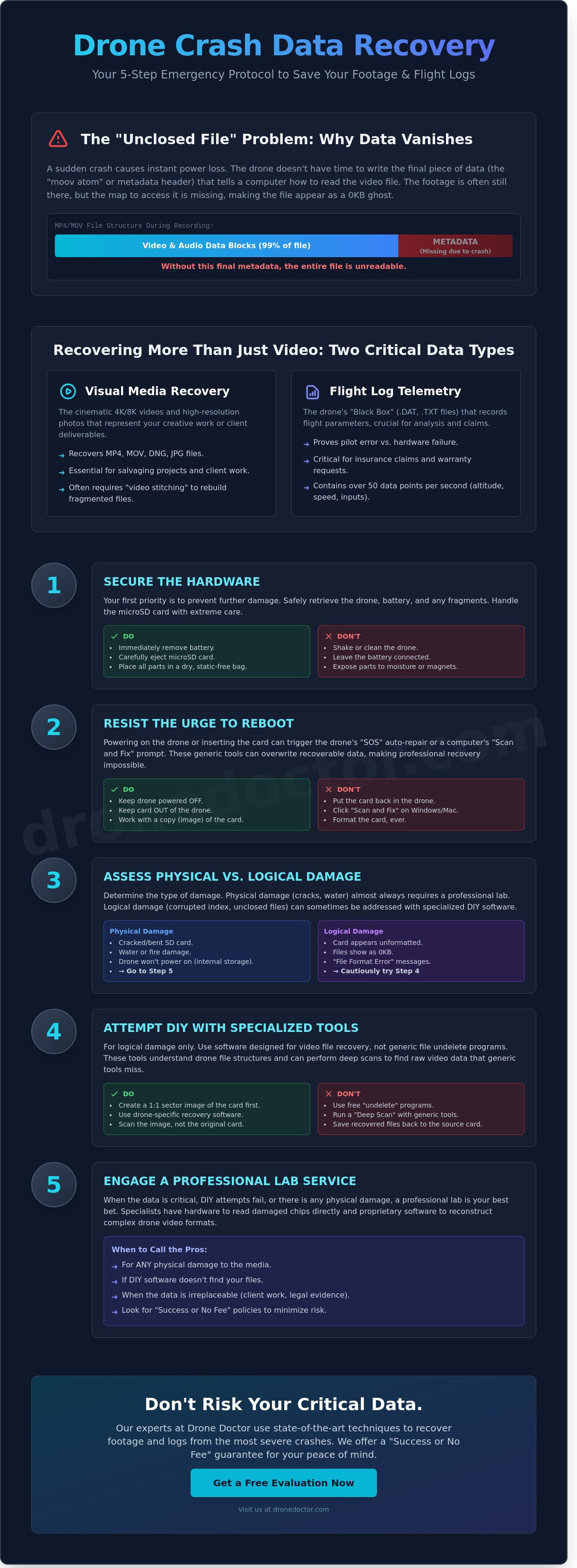
The 5-Step Drone Crash Data First Aid Kit
Act fast! When your drone hits the ground, every second counts. The moments immediately following a collision determine whether your footage is saved or lost forever. Follow this professional protocol to maximize your chances of successful drone crash data recovery.
- Step 1: Immediate Power Down. Pull the battery as soon as you reach the aircraft. Keeping the drone powered on allows the system to continue writing cache files or flight logs, which can overwrite the very video sectors you're trying to save.
- Step 2: Physical Inspection. Check the SD card slot and the area around internal storage chips for fine dust, moisture, or structural cracks. If the casing is breached, stop right there.
- Step 3: Write-Protection. Once the SD card is out, slide the physical lock switch on the side of the adapter to "Lock." If you're working with internal storage, use software-based write-blocking tools before mounting the drive.
- Step 4: Bit-by-Bit Imaging. Never work on the original files. Use a cloning tool to create a 100% identical image of the storage media. This "clone" lets you attempt various recovery methods without risking the original data.
- Step 5: Logical Reconstruction. Most crash-related data loss happens because the file "header" wasn't closed properly. Use professional reconstruction software to rebuild these headers and make the video stream readable by standard players.
Handling Water-Damaged Drones
Forget the rice trick. It's a myth that causes more harm than good. Rice introduces starch and dust into your drone's sensitive circuitry, which can accelerate corrosion. Instead, use 99% Isopropyl alcohol to displace moisture from internal storage components. If you've crashed in salt water, the situation is critical. You have less than 60 minutes before salt crystals begin to form and permanently etch the data chips. Rinse the components in distilled water first, then submerge them in high-purity alcohol to stop the oxidation process immediately.
Securing the SD Card
If your gimbal is bent, don't force the microSD card out with your fingernails. Use precision tweezers to gently extract it without putting pressure on the card's thin casing. Clean the gold contacts with a microfiber cloth and a drop of Isopropyl alcohol. Never use abrasive materials like erasers, which can scratch the gold plating. Most importantly, don't put the card back into the drone or a camera to "test" if it works. The device's operating system might automatically attempt a "file repair" that actually wipes the corrupted sectors you need to recover. Trust our expertise as the leader in Sales, Repair, and Service to handle these delicate situations.
Don't let a crash ruin your hard work. Our team of experts is ready to help you get back in the air and save your files. Act NOW!
Secure your drone crash data recovery services today at Drone DoctorDrone Doctor: The Leader in Sales, Repair, and Data Recovery
Drone Doctor stands as the undisputed leader in drone sales, repair, and service. Whether you're a weekend hobbyist or managing a massive enterprise fleet, we've got your back. We understand that a crash is more than just broken carbon fiber; it's lost time and potentially lost assets. That's why we offer a "Success or No Fee" guarantee on all critical drone crash data recovery projects. If our technicians can't get your files back, you won't pay a dime for the recovery attempt. This commitment to results is why 95% of our clients return to us for their future equipment needs.
Our team bridges the gap by integrating these specialized data services directly with our world-class drone repair lab. You'll get your hardware fixed and your data restored in one seamless, professional workflow. We also pride ourselves on being accessible to every pilot in our community. Our staff includes dedicated bilingual support members like Jose and Liz, so you can communicate your technical needs clearly. Se habla Español! We're here to ensure your experience is personal, helpful, and efficient.
Enterprise-Grade Data Security
Industrial missions involving LiDAR, thermal imaging, and high-resolution 3D mapping require a higher level of security and care. We treat your sensitive data with the same urgency as a mission-critical flight. Our lab utilizes secure, encrypted transfer protocols to handle massive 3D mapping files and sensitive infrastructure data. We ensure your proprietary information stays private from the moment your SD card or internal storage arrives at our facility.
If your aircraft sustained terminal damage that makes a repair unfeasible, don't worry. You can browse our latest drones for sale to find a 2026-spec replacement that gets you back on the job site immediately. We stock the latest professional rigs designed to handle the most demanding aerial data collection missions.
Get Your Quote Today!
Ready to recover your lost footage? Shipping your damaged drone or SD card to us is simple and secure. For 2026, we've optimized our intake process to offer an average turnaround time of just 3 to 5 business days for drone crash data recovery forensics. You shouldn't wait until it's too late to take action. Act NOW to secure your files before oxidation from water damage or file corruption from a failing controller makes recovery impossible.
- Secure your SD card in an anti-static bag before shipping.
- Use a double-padded box for any damaged hardware.
- Include a brief note detailing the crash conditions to help our forensic team.
- Contact us immediately for a shipping label and a custom quote.
Don't let a single mistake erase hours of hard work. Trust the experts who live and breathe drone technology every single day. Shop with confidence and get back in the air fast!
Take Command of Your Data and Get Back in the Air
A crash doesn't have to mean a permanent loss of your high-resolution footage or critical flight telemetry. Industry data indicates that roughly 85 percent of data corruption cases are recoverable when you follow the 5-step first aid protocol immediately after an impact. You've learned that while DIY software might fix a minor file glitch, physical hardware failure requires the specialized tools found in a professional lab. Our expert technicians, Liz and Jose, have personally overseen more than 10,000 successful recoveries and repairs since we became the leader in Sales, Repair, and Service. We understand how much your gear and your digital assets mean to your business. That's why we provide expert support for every pilot, and we're proud to say Se habla Español. Trust the experts to handle your drone crash data recovery so you can focus on your next mission instead of worrying about lost files. We're standing by to ensure your 2026 flight season stays on track.
Secure your data and get a repair quote NOW!
Your next great shot is just one successful recovery away; let's get started today.
Frequently Asked Questions
Can I recover drone footage if the SD card was snapped in the crash?
Yes, you can recover data from a snapped SD card if the internal memory chip remains intact. Professional labs use chip-off techniques to read the NAND flash directly. If the physical crack misses the storage area, success rates often exceed 90 percent. Don't try to tape it back together or insert it into a reader. This could cause a short circuit and kill the data forever.
Why does my recovered drone video show a black screen or won't play?
Your video won't play because the file header didn't close properly during the impact. Most drone cameras write data in real time, but they need a final moov atom to make the file readable. If the power cuts instantly, the file stays orphaned. You'll need specialized repair tools to rebuild the metadata. It's a common issue we see after high speed collisions.
How do I get flight logs off a drone that won't power on?
You can usually pull flight logs by connecting the aircraft to a computer using the DJI Assistant 2 software. Even if the motors don't spin, the internal logic board often stays powered via the USB port. This is a vital step in drone crash data recovery to understand why the bird fell. Most DJI models store the last 30 flights in their internal DAT files.
Will DJI Care Refresh cover data recovery services?
No, DJI Care Refresh doesn't cover any form of data recovery or file repair services. Their policy focuses strictly on hardware replacement or mechanical repairs for the physical unit. According to the DJI Care Refresh Terms of Service, users are responsible for backing up their own media. If your footage is trapped on a dead board, you'll need an expert partner to help.
How much does professional drone data recovery typically cost?
Professional recovery costs vary widely based on the damage level. Industry data from providers like Ontrack indicates that laboratory data recovery typically costs between $300 and $2,000 for complex cases. These fees cover the cleanroom environment and specialized equipment needed to bypass damaged controllers. Secure your quote early to ensure your drone crash data recovery stays within your budget.
Is it possible to recover 'overwritten' drone footage?
No, you can't recover footage once it's been overwritten by new recordings. When a drone continues to record after a crash or you reuse the card, new data physically replaces the old binary code. Forensic experts at Gillware confirm that once a sector is overwritten on flash media, the original data is gone for good. Stop using the SD card the second a crash occurs.
Can you recover data from a drone that was submerged in salt water?
Recovery is possible, but you must act within 24 hours to stop salt crystals from eating the electronics. Salt water causes rapid electrolysis and corrosion that can destroy a circuit board in less than a day. Rinse the drone or card in distilled water immediately to remove the salt. Don't wait for it to dry on its own. Speed is your best friend here.
What is the best software for DIY drone video repair?
Stellar Repair for Video and Untrunc are the most reliable software options for fixing broken drone files. Stellar currently holds a 4.5 star rating on Trustpilot for its ability to handle 4K DJI and Autel files. These tools work by using a reference file from the same camera to rebuild the corrupted structure. It's the best DIY starting point for any recovery project.