

Drone Vision Sensor Calibration: The Ultimate 2026 Guide to Precision Flight
You're on-site for a critical infrastructure inspection when your controller suddenly screams with a vision system error. You try to restart, but you're trapped in a "Calibration Failed" loop while your client watches the clock and your revenue evaporates. It's a frustrating reality for many pilots, but it doesn't have to ground your operations. Mastering drone vision sensor calibration is the single most important step you can take to ensure maximum safety and professional-grade flight performance in 2026.
We know how stressful it feels when your obstacle avoidance fails or your enterprise gear stays grounded. You want clear, successful results without the technical headache. This guide is your roadmap to total precision. We'll walk you through using the latest DJI Assistant 2 software versions, including Consumer V2.1.40 and Enterprise v2.1.20, to restore your drone's sight. You'll learn exactly how to fix software glitches, recognize when a sensor is physically broken, and regain the confidence to fly even the most complex missions. Let's get your equipment back in the air where it belongs.
Key Takeaways
- Understand how stereoscopic vision and depth perception work together to prevent crashes and ensure total flight stability.
- Master the exact step-by-step process for a successful drone vision sensor calibration using the latest DJI Assistant 2 software versions.
- Discover how to bypass the "Resolution Mismatch" trap and other common software errors that trigger frustrating calibration loops.
- Learn why enterprise-grade drones require specialized calibration to maintain centimeter-level positioning and high-stakes safety.
- Identify the three definitive signs of physical sensor damage that require professional repair services rather than a software fix.
What is Drone Vision Sensor Calibration & Why Does It Matter?
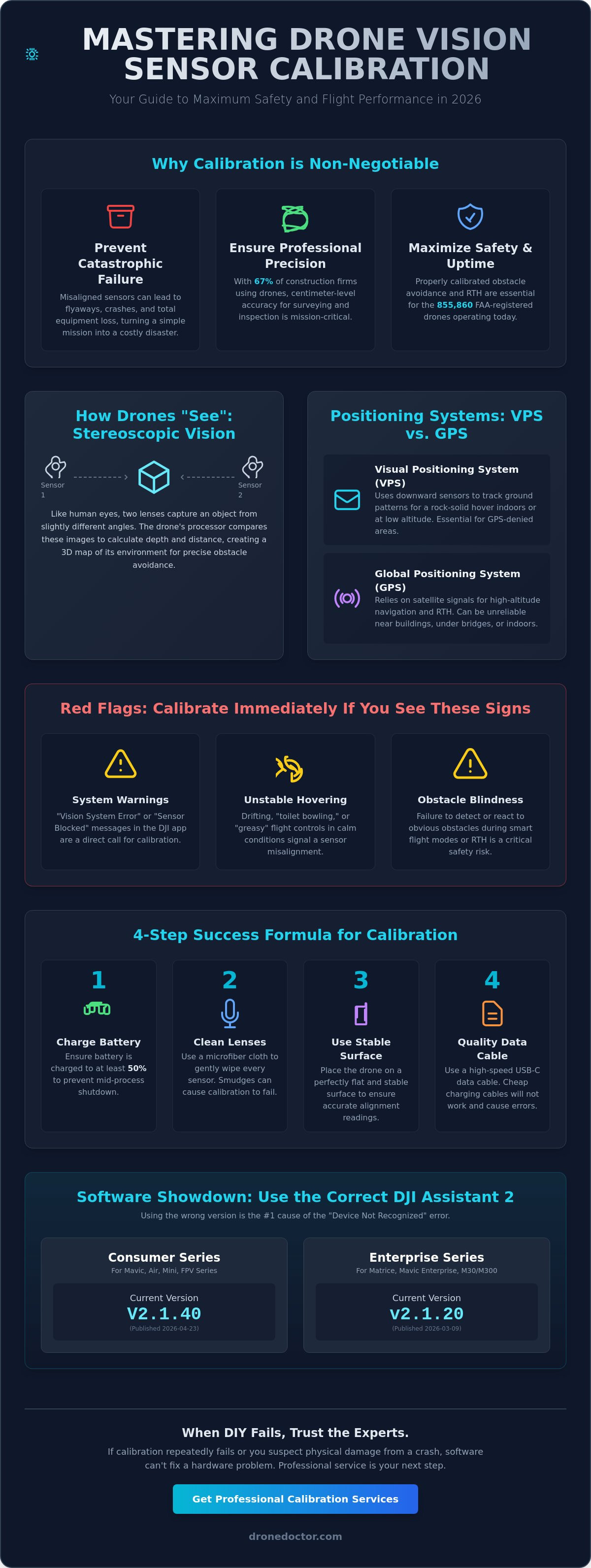
Think of drone vision sensor calibration as the process of teaching your aircraft exactly where its eyes are looking. It is the critical alignment between the onboard cameras and the flight controller. When these systems are in sync, your drone perceives the world in three dimensions with startling accuracy. Without this synergy, your high-tech investment is essentially flying blind, relying on guesswork rather than data. For the 855,860 drones registered with the FAA as of late 2026, maintaining this digital sight is the difference between a successful mission and a total loss.
Modern drones utilize stereoscopic vision to navigate. This works exactly like human sight; two lenses capture the same object from slightly different angles to calculate depth and distance. This allows for real-time obstacle detection and precise maneuvering. However, these sensors are incredibly sensitive. High-frequency motor vibrations and rapid temperature swings during field operations cause "sensor drift" over time. Even a microscopic physical shift in a lens mount can lead to a massive calculation error in the sky. This is where the principles of camera auto-calibration become vital, as the software works to reconcile the digital image with the physical reality of the drone's position.
Safety is the ultimate priority. If your vision sensors are misaligned, the drone might fail to recognize a power line during an automated Return to Home (RTH) sequence. It could even trigger a "flyaway" if the internal logic becomes confused by conflicting visual and GPS data. Precision is not optional. With 67% of construction firms now relying on drones for site surveying, the stakes for accuracy have never been higher. Master this protocol to protect your gear and your reputation.
Visual Positioning System (VPS) vs. GPS
GPS is fantastic for high-altitude navigation, but it struggles in "GPS-denied" environments like the underside of a bridge or inside a warehouse. This is where the Visual Positioning System (VPS) takes over. VPS is the drone's 'eyes' for short-range spatial awareness. It uses downward-facing sensors to track patterns on the ground, enabling a rock-solid hover even without a satellite lock. It also powers precision landing and terrain follow features, ensuring the aircraft maintains a consistent height over uneven ground. If your VPS is out of whack, your drone will feel "greasy" and difficult to control in tight spaces.
Signs Your Drone Needs Immediate Calibration
Don't wait for a crash to realize something is wrong. Watch for these red flags during your pre-flight check:
- System Warnings: Intermittent "Vision System Error" or "Sensor Blocked" pop-ups in the DJI Fly or Pilot 2 app are clear cries for help.
- Unstable Hovering: If your drone drifts or "toilet bowls" while you aren't touching the sticks, your sensors are likely misaligned.
- Obstacle Blindness: The aircraft fails to brake or bypass obvious objects during smart flight modes or RTH.
If you see these signs, stop flying immediately. A quick calibration session can save you thousands in repair costs later.
How to Calibrate DJI Vision Sensors Using DJI Assistant 2
Successful drone vision sensor calibration starts long before you click the "Start Calibration" button. Preparation is your best defense against the dreaded "Calibration Failed" loop. First, ensure your aircraft battery is charged to at least 50%. The process is intensive and can take up to 10 minutes; a mid-calibration shutdown can cause firmware corruption. Next, use a microfiber cloth to wipe every vision sensor lens. Even a tiny smudge can distort the camera's perception of the calibration patterns. Finally, place your drone on a flat, stable surface and use a high-quality USB-C data cable. Avoid using cheap charging cables that lack high-speed data transfer capabilities.
Choosing the Right Version of DJI Assistant 2
One of the most common pitfalls is using the wrong software. DJI maintains separate versions of Assistant 2 for different product lines. As of May 2026, the current verified versions are V2.1.40 for the Consumer Series (published 2026-04-23) and v2.1.20 for the Enterprise Series (published 2026-03-09). Using the Enterprise version for a DJI Air 3S will result in a "Device Not Recognized" error every single time. Visit the official DJI Download Center to grab the specific installer for your model. If you've hit a wall with software glitches, our team at dronedoctor.com can help diagnose if the issue is your PC or the drone itself.
Mastering the Calibration Pattern Alignment
Once the software recognizes your drone, the "Screen Dance" begins. You will see a series of dots on your monitor that the drone's sensors must track. This is where precision matters most. Position the aircraft between 1.5 and 3 feet from your screen. If you're too close, the sensors can't see the full pattern; too far, and they lose focus. Keep your monitor brightness at 100% and eliminate any glare from windows or overhead lights. Glare creates "blind spots" for the sensors, causing the software to lose track of the alignment dots.
The technical accuracy of this process is backed by extensive research into spatial awareness. According to an IEEE paper on UAV sensor calibration, the environmental lighting and the contrast of the calibration target are the two biggest variables in determining final flight stability. For the lateral and upward sensors, use a tripod or a stack of books to keep the drone perfectly level. Shaky hands during these phases often trigger a "Calculation Failed" error at the 90% mark. After you complete all sensor sets, the software will upload the data and prompt a mandatory reboot. Do not skip this. The drone must power cycle to initialize the new calibration parameters before your next flight.
Troubleshooting 'Calibration Failed' and Common Errors
Don't panic when that red "Calibration Failed" text appears on your screen. Most errors during drone vision sensor calibration are environmental or software-based rather than hardware failures. The 'Resolution Mismatch' trap is a prime example. If you're using a high-end 4K monitor or an ultra-wide screen, the DJI Assistant 2 software often fails to scale the calibration patterns correctly. The drone's cameras expect a standard pixel density to track the dots. If you hit a wall, switch your display resolution to 1920x1080 (1080p) before trying again. It sounds counterintuitive to downgrade your display, but the software logic is often optimized for this standard HD scaling.
Specific error codes like 16200202 can be particularly frustrating. In many cases, this is a communication glitch caused by a poor data handshake between your PC and the aircraft. However, if this error persists across multiple computers and different cables, it's a strong indicator of a faulty sensor module. Another common headache is the 'Stuck at 85%' problem during the final calculation phase. This usually points to a bottleneck in the data upload. It happens when the aircraft's internal processor is overwhelmed or the USB connection is unstable. Try using a shorter, shielded cable and plug it directly into a motherboard port rather than a front-panel USB hub.
Environmental Factors That Kill Calibration
Lighting is a silent killer of successful calibration sessions. Fluorescent bulbs flicker at a frequency that is invisible to your eyes but looks like a strobe light to your drone's sensors. This flicker prevents the cameras from locking onto the patterns on your screen. Always calibrate in a room with natural, indirect light or incandescent bulbs. Additionally, use a monitor with a matte finish if possible. Glossy screens act like mirrors; the drone might accidentally try to calibrate to the reflection of the room instead of the actual dots on the screen. Even electromagnetic interference (EMI) from high-powered speakers or nearby routers can occasionally disrupt the sensitive data link during the upload phase.
The 'Clean Sensor' Protocol
Your drone's eyes must be spotless for the software to work. Use 70% isopropyl alcohol and a high-quality microfiber cloth to gently remove smudges or oily fingerprints. Never use glass cleaner or paper towels, as they can strip anti-reflective coatings or leave microscopic scratches. Watch out for internal fogging too. If you move your drone from a cold car into a warm house, condensation can form inside the sensor housing. Wait 30 minutes for the temperature to stabilize before you start the process. Carefully examine the sensor glass under a bright light to identify hairline fractures that might be invisible at first glance.
Enterprise & Industrial Sensor Calibration: Matrice and Mavic Enterprise
Precision is non-negotiable for enterprise operations. When you're flying a Matrice 350 RTK near high-voltage power lines or conducting a commercial roof inspection, your equipment depends on a flawless six-directional vision system. These industrial platforms are far more sensitive to vibration and G-force than consumer models. Heavy payloads and rapid accelerations can cause subtle shifts in sensor alignment over time. This makes regular drone vision sensor calibration a mandatory part of your maintenance schedule rather than an occasional fix. With 37% of FAA-registered drones now dedicated to commercial use, the demand for professional-grade accuracy has never been higher.
Centimeter-level positioning relies on the synergy between RTK (Real-Time Kinematic) data and visual sensors. While RTK provides the global coordinates, the vision system handles the local spatial awareness. If your sensors aren't perfectly aligned, the drone might struggle to maintain a steady hover in tight spaces, even with a strong satellite lock. This misalignment also impacts the "PinPoint" and "Smart Track" features in the DJI Pilot 2 app. If you notice your thermal overlays don't match the visual footage perfectly, it's a clear sign that your sensors are out of sync. For complex enterprise hardware issues, trust the experts at dronedoctor.com to restore your fleet to factory specifications.
Maintaining the DJI Matrice 300/350 RTK Vision System
Industrial platforms like the Matrice 300 series utilize a complex web of sensors to provide 360-degree obstacle avoidance. Every time you perform a major firmware update, such as the Enterprise v2.1.20 release from March 2026, the system often requires a fresh vision calibration. The software needs to re-map the sensor data to the new firmware logic to ensure maximum safety. Many pilots ask if they can perform this in the field. While you can calibrate the IMU and compass on-site, a full vision system calibration still requires a PC running DJI Assistant 2 and a high-contrast screen. Don't risk a $15,000 aircraft by skipping this step in the office before heading to the job site.
Calibration for Photogrammetry and Mapping
In the world of mapping, even a tiny sensor error creates massive "noise" in your 3D models and orthomosaics. Misaligned vision sensors lead to inaccurate depth perception, which causes the flight controller to make micro-adjustments that blur your data. This isn't just a technical annoyance; it's a financial drain. Redoing a cell tower or bridge inspection because of poor data can cost thousands in lost labor and travel. For high-accuracy payloads like the Zenmuse L2, some enterprise workflows may require specialized calibration boards to ensure the LiDAR and visual sensors are perfectly co-registered. Keep your sensors sharp to keep your models clean.
When DIY Fails: Professional Drone Repair & Calibration Services
Sometimes the software "screen dance" just isn't enough to solve your flight issues. If you've followed every technical step and still face a persistent error, you're likely dealing with hardware failure. Attempting to force a drone vision sensor calibration on damaged hardware is a recipe for disaster. We call this the "Checklist of Doom." If you notice visible hairline fractures on the sensor glass, a rattling sound inside the drone's shell, or an error that persists even after the software claims a "successful" upload, stop. These symptoms point to internal trauma that code can't fix.
Internal ribbon cable damage is the most common culprit behind persistent vision errors. These tiny, paper-thin cables act as the drone's nervous system, connecting the Visual Positioning System (VPS) to the core flight controller. During a crash or even a hard landing, these cables can partially unseat or develop microscopic tears. You won't see this from the outside, but the data link is compromised. Some pilots try to "hack" their way around these errors by disabling sensors in the firmware. Avoid this. Bypassing a safety sensor removes your obstacle avoidance net and can lead to a total hull loss during your next mission. At Drone Doctor LLC, we use factory-grade diagnostics to identify these hidden faults and restore your drone's sight with precision.
The Professional Diagnostic Process
Our experts go far beyond basic software prompts. We start with a deep-cleaning and internal inspection to find cracks in the sensor module that a standard microfiber cloth can't reach. We then test the communication bus between the VPS and the flight controller. This ensures every packet of data reaches its destination without interference. Finally, every drone undergoes full flight testing in a controlled environment. We verify the obstacle avoidance response in real-world conditions so you can fly with total peace of mind.
Fast-Track Your Repair
Don't let a "Calibration Failed" loop keep you grounded for weeks. Choosing a specialist is significantly faster and safer than attempting a DIY sensor replacement. DIY attempts often lead to static discharge damage on the mainboard, which can be far more expensive than the original sensor issue. You can easily get a quote and ship your aircraft to our drone repair experts for a rapid turnaround. We have the specialized optical alignment benches and factory tools required to calibrate gear to original specifications. Your equipment is an investment. Protect it by choosing professional service. Get your drone back in the air with a pro calibration today!
Secure Your Flight Future and Fly with Total Confidence
Precision flight isn't just a luxury; it's a requirement for every pilot in 2026. You now have the tools to navigate the latest DJI Assistant 2 software and identify the environmental traps that trigger frustrating "Calibration Failed" loops. From choosing the correct firmware version to recognizing the physical "Checklist of Doom," mastering drone vision sensor calibration is your best defense against unexpected crashes and lost revenue.
Don't let a hardware glitch or a stubborn software error keep you grounded while your passion stays on the sidelines. Our expert DJI-certified technicians provide a fast turnaround for both consumer and enterprise models. We don't just swap parts; we include comprehensive flight testing with every repair to ensure your obstacle avoidance is factory-perfect. Stop guessing about your sensor health and start flying with the peace of mind you deserve.
Get Your Drone Professionally Calibrated & Repaired Now!
Your next mission is waiting. Let's make sure your aircraft is ready to see it through with absolute precision and safety!
Frequently Asked Questions
How do I know if my drone vision sensors are out of calibration?
Your drone will display a "Vision System Error" or "Sensor Error" warning in the DJI Fly or DJI Pilot 2 app. You might also notice the aircraft drifting in place or failing to stop before an obstacle. If your hover feels unstable even with a strong GPS lock, it's time to check your calibration status. These signs indicate that the flight controller can't trust the visual data it's receiving.
Can I calibrate my DJI drone sensors without a computer?
No, a full drone vision sensor calibration requires a PC or Mac running the DJI Assistant 2 software. While you can calibrate the IMU and compass using just your remote controller and the mobile app, the vision cameras need to track specific patterns on a high-resolution monitor. This process requires the processing power and data link that only a direct computer connection provides.
Why does my DJI Assistant 2 say 'Calibration Failed' every time?
The most common reason for repeated failure is a mismatch between your monitor's resolution and the software's requirements. If you're using a 4K or ultra-wide screen, the sensors often fail to track the dots. Switch your resolution to 1080p and ensure your screen brightness is at 100%. Glare or dirty sensor lenses are also frequent culprits that disrupt the alignment process.
Is it safe to fly my drone if the vision system has an error?
It's not recommended to fly with a vision system error because your obstacle avoidance and precision hovering will be disabled. Flying without these sensors increases the risk of collisions, especially in tight spaces or during automated Return to Home sequences. If you must fly, do so only in wide-open areas and maintain full manual control. Safety should always be your first priority.
How much does it cost to have a professional fix a vision sensor error?
Professional repair costs vary based on whether the issue is a simple software recalibration or a physical hardware replacement. Diagnostic fees usually apply, but these are often credited toward the final repair cost if you proceed with the service. Since hardware prices vary by model, getting a specific quote from a certified technician is the most accurate way to plan your budget.
Does a firmware update reset my vision sensor calibration?
Yes, major firmware updates often require a fresh drone vision sensor calibration to ensure the new software logic matches the hardware data. This is particularly common with enterprise models like the Matrice series. If you see a calibration prompt immediately after an update, don't ignore it. The update may have changed how the flight controller interprets depth and spatial data.
Can scratched vision sensor lenses be repaired or must they be replaced?
Scratched lenses usually require a full replacement of the vision sensor module because any imperfection distorts the camera's depth perception. Polishing the glass can lead to uneven surfaces that confuse the stereoscopic algorithms used for navigation. If the software can't complete a calibration due to lens damage, a hardware swap is the only safe way to restore your obstacle avoidance.
What is the best monitor resolution for DJI vision sensor calibration?
A standard 1920x1080 (1080p) resolution is the most reliable setting for a successful calibration session. Most versions of DJI Assistant 2 are optimized for this specific aspect ratio and pixel density. If you're using a larger monitor, manually adjust your display settings to 1080p and turn off any blue-light filters or "night mode" settings that might reduce the contrast.