

How to Fix My Drone: A Complete Post-Crash Guide
The sickening crunch. The sudden silence. That heart-sinking moment when your prized drone meets the ground-hard. Before the panic fully sets in, take a deep breath. We know the questions racing through your mind: Is it totaled? How much will this cost? That frantic online search for "how to fix my drone" ends right here. As the leaders in drone sales, repair, and service, we've seen it all, and we're here to turn that post-crash anxiety into a clear, confident action plan.
This is your complete guide to getting back in the air, FAST! We'll walk you through a step-by-step damage assessment so you know exactly what you’re dealing with-from a simple propeller swap to a complex gimbal issue. From there, we’ll help you make the smart, informed call between a confident DIY repair and trusting the job to our expert pros. Our mission is to empower you with the knowledge to get your drone flying again quickly and affordably. Let's get started!
Key Takeaways
- Crashed your drone? Don't panic! Discover the crucial first steps to take (and mistakes to avoid) right after an incident to protect your gear.
- Master a quick, systematic damage assessment with our DIY diagnostic checklist to pinpoint exactly what's broken before deciding on your next move.
- Before you try to fix my drone yourself, understand the key factors that determine whether a DIY repair or a professional service is the smarter, faster choice.
- Learn when to hand it over to the pros and how expert service can save you time, money, and stress, getting you back in the air with confidence.
First Steps After a Crash: What to Do (and Not Do) Immediately
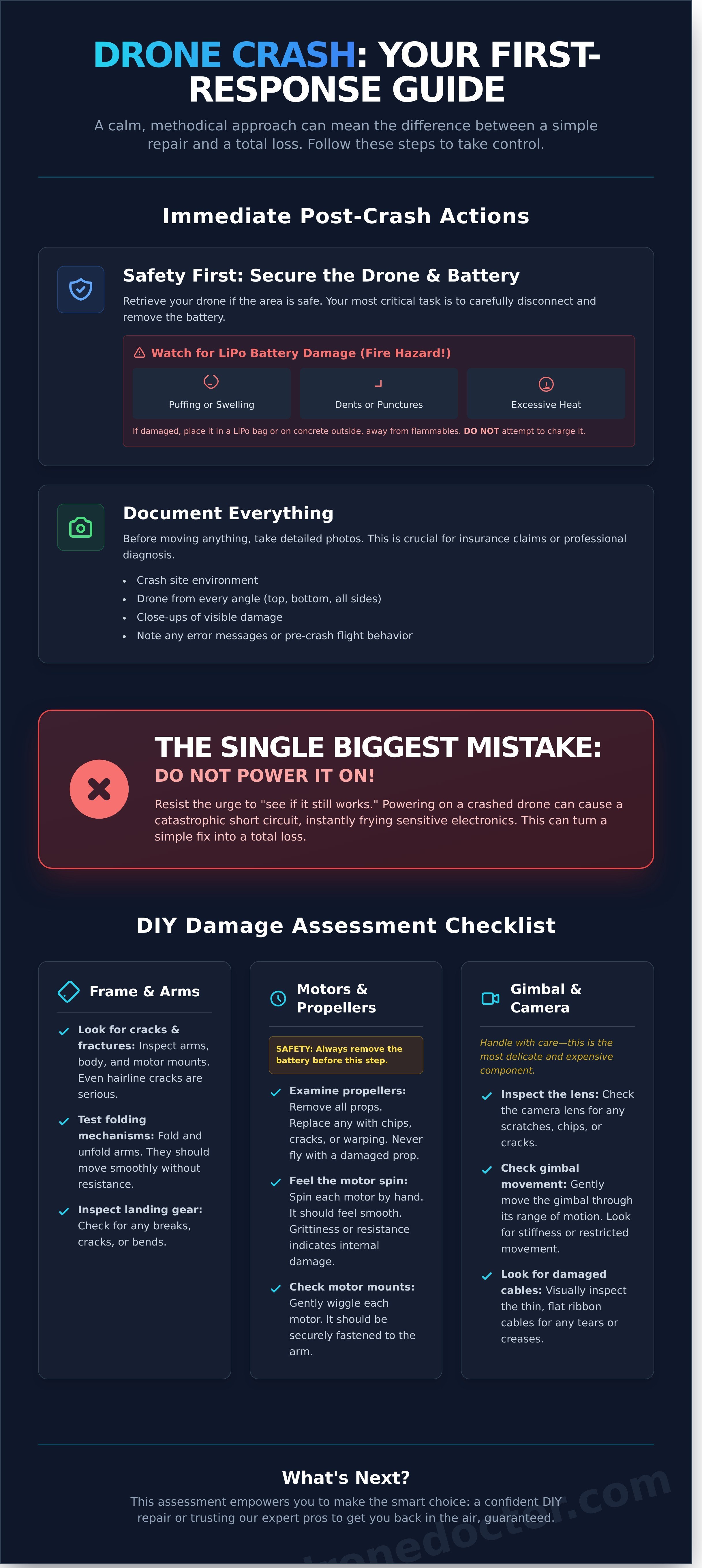
That sinking feeling is real. The sound of a crash is something no pilot wants to hear. But don't panic! What you do RIGHT NOW is critical. A calm, methodical approach can mean the difference between a simple repair and a total loss. This is your immediate action plan to take control and set the stage to successfully fix my drone.
Safety First: Secure the Drone and Battery
Your first priority is safety. If the area is secure and accessible, retrieve your drone immediately. The most dangerous component is the battery. Carefully disconnect and remove it, even if it looks fine. Be on high alert for signs of a damaged LiPo battery, which can be a serious fire hazard:
- Puffing or Swelling: The battery casing looks bloated or soft.
- Dents or Punctures: Any physical breach of the battery's outer shell.
- Excessive Heat: The battery is hot to the touch long after the crash.
If you suspect any damage, place the battery in a fireproof LiPo bag or on a concrete surface outside, far away from anything flammable. Do not attempt to charge it. Ever.
DO NOT Power It On
This is the single most important rule. We can't stress this enough: DO NOT try to power on your drone to "see if it still works." Powering on a crashed drone can send electricity through damaged circuits, causing a catastrophic short. This one mistake can instantly fry your flight controller, ESCs, or other sensitive electronics, turning a simple, repairable issue into a total write-off. Resist the temptation! It's the costliest mistake you can make at this stage.
Document Everything: Photos and Notes
Now, become a detective. Before you move or clean anything, pull out your phone. Take clear, detailed photos of the crash site and the drone from every single angle-top, bottom, and all sides. This documentation is your best friend, whether you're filing an insurance claim or bringing it to a pro technician for a diagnosis. A solid baseline for understanding drone components can help you spot and photograph critical damage. Also, make a mental or written note of any error messages on your controller or unusual flight behavior right before the crash. These details are vital clues for the repair process.
Assessing the Damage: A DIY Diagnostic Checklist
After a crash, your first instinct might be panic. Don't worry-we're here to help you get back in the air! Before you can figure out how to fix my drone, you need a clear picture of the problem. This systematic diagnostic is your first step toward a solution. A thorough pre-flight check is always mandatory for safe flying, as outlined in the official FAA operational guidelines, and this post-crash assessment is just as critical. Grab your drone, find a well-lit area, and let’s dive in. This checklist will empower you to understand the damage, making you a more informed pilot whether you tackle the repair yourself or bring it to our pro technicians.
Checking the Frame and Arms
The drone's skeleton takes the brunt of any impact. A compromised frame can lead to unstable flight or total failure, so be meticulous here. Start with a full visual inspection and then get hands-on.
- Look for cracks and fractures: Carefully inspect each arm and the main body, paying close attention to joints and motor mounts. Even a hairline crack is a serious structural issue.
- Test folding mechanisms: If your drone has folding arms, gently fold and unfold them. They should move smoothly without resistance or clicking sounds.
- Inspect landing gear: Check for any breaks, cracks, or bends in the landing gear. Damaged gear can cause an unstable takeoff or landing.
Inspecting Motors and Propellers
Your propulsion system is the heart of your drone's performance. Damage here can ground you instantly. Safety First: Always remove the battery before inspecting motors and propellers.
- Examine every propeller: Remove all props and check them for chips, cracks, or warping. A damaged propeller is unbalanced and must be replaced. Never fly with a compromised prop!
- Feel the motor spin: Gently spin each motor by hand. It should feel smooth. Any grittiness, resistance, or wobble points to internal damage or debris.
- Check motor mounts: Wiggle each motor lightly to ensure it's securely fastened to the arm. A loose motor is a major flight risk.
Examining the Gimbal and Camera
This is the most delicate-and often most expensive-part of your drone. Gimbal damage is complex and requires a gentle touch. Be extra careful during this part of your inspection.
- Inspect the lens: Look for any scratches, chips, or cracks on the camera lens itself.
- Check for free movement: Visually inspect the gimbal assembly for bent parts or disconnected ribbon cables. Do not force its movement.
- When to call the pros: Due to its intricate motors and sensors, gimbal repair is almost always a job for a professional. If you suspect any damage here, it’s best to seek expert service.
The Big Decision: DIY Repair vs. Professional Service
You’ve diagnosed the problem, and now you’re at the most critical fork in the road. Deciding whether to tackle the repair yourself or hand it over to a professional will determine the cost, time, and ultimate success of getting your drone back in the sky. To make the right call, it's essential to have a clear picture of the damage. Running through an official maintenance checklist can help you accurately assess the situation before you proceed.
When to Consider DIY Drone Repair
Feeling adventurous? For pilots with a knack for tech, a DIY fix can be incredibly rewarding. This path is best suited for straightforward, low-risk issues where a mistake won't ground your drone for good. If you want to fix my drone on a budget for minor issues, this is your route.
- Pros: You'll save money on labor costs and gain an intimate understanding of how your drone works-an invaluable experience!
- Cons: The biggest risk is turning a small problem into a catastrophic one. You'll have no warranty on your work and will need to invest in specific tools. Remember, many electronic repairs require solid soldering skills.
When to Choose a Professional Repair Service
When you're facing complex, mission-critical problems, calling in the experts is the smartest move. Don't risk your expensive equipment on a guess. Issues with the gimbal, camera, motherboard, or persistent, unknown errors demand professional attention and precision tools.
This principle of trusting experts for complex jobs extends beyond just drones. For example, businesses dealing with critical network installations or troubleshooting don't leave it to chance; they bring in specialists. A professional service, such as the Prague-based IT Doma, ensures that vital systems are handled correctly, which is the same level of care you should consider for your high-tech drone.
- Pros: You get total peace of mind. Our expert technicians use specialized diagnostic and calibration tools to guarantee a perfect fix, all backed by a service warranty.
- Cons: The primary drawbacks are the higher cost compared to DIY and the downtime while your drone is shipped and serviced.
Still on the fence? Don't risk your investment on a hunch. The best way to move forward with confidence is to get an expert opinion. Not sure what to do? Get a free diagnostic estimate from our experts! We'll give you a clear, honest assessment so you can make the best choice for your gear.
Your Guide to DIY Drone Repair: Sourcing Parts and Tools
Ready to roll up your sleeves and get hands-on? We love that spirit! Tackling a DIY repair can be incredibly rewarding, but success hinges on having the right equipment. Before you start, let's make sure your workbench is stocked with everything you need. When you decide to fix my drone at home, preparation is everything-it’s the difference between a successful flight and a more expensive problem.
Finding the Right Parts
Your drone is a high-performance machine; don't compromise its integrity with cheap, unreliable parts! Always use high-quality, OEM-spec components to ensure perfect compatibility and performance. You can typically find the exact part number printed on the damaged component or in your drone’s user manual. Using the wrong part can lead to flight instability or even total failure. Don't risk it!
Ready to get started? Shop our massive inventory of genuine drone parts now!
Essential Tools for Your Workbench
Having the correct tools is non-negotiable for precision electronics work. Makeshift solutions can easily strip a screw or damage a delicate circuit board. Gear up with these must-haves before you begin:
- A precision screwdriver set with multiple bit types (Phillips, Torx, etc.).
- Plastic spudgers or opening tools to safely pry open casings without scratching them.
- A quality soldering iron with a fine tip for any board-level repairs.
- An anti-static wrist strap and mat to protect sensitive electronics from discharge.
- A magnetic project mat to keep those tiny, easy-to-lose screws organized.
Following Reliable Repair Guides
Don’t go in blind! Look for detailed video tutorials or step-by-step guides from reputable sources like iFixit or trusted YouTube channels. Always watch the entire teardown video before you even pick up a screwdriver. This helps you anticipate tricky steps and understand the full scope of the repair. Be warned: many online guides assume a high level of technical skill. If a guide looks more complicated than you expected, that’s your cue to pause. The goal is to successfully fix my drone, not create a bigger headache. Remember, if you get stuck, our expert technicians at dronedoctor.com are always here to help.
Why Choose Drone Doctor for Your Professional Repair
You've weighed the options, and you know your drone deserves an expert's touch. When you decide it's time to bring in a professional, you need a partner you can trust-not just a repair shop. At Drone Doctor, we are The Leader in Sales, Repair, and Service for a reason. We combine world-class technical skill with a passion for getting pilots like you back in the sky.
Expert Technicians and Fast Turnaround
Forget the guesswork. Our team is composed of certified, experienced technicians who fix drones all day, every day. We've seen it all. Using state-of-the-art diagnostic and calibration tools, we pinpoint issues with precision and speed. Our single mission is to get your drone flying perfectly again and back in your hands FAST, because we know every moment on the ground is a missed opportunity for an amazing flight.
Transparent Pricing and a Hassle-Free Process
We believe getting your drone repaired shouldn't be a black box of hidden fees and confusing steps. We address the "how will I fix my drone?" question with total clarity. Our process is designed for your peace of mind:
- Get a Free Quote: Know the cost upfront with our no-obligation diagnostic estimates.
- Simple Mail-In: Securely package your drone and ship it to our state-of-the-art facility.
- Guaranteed Work: We stand by our service. Every repair is backed by our comprehensive warranty.
We Fix What Others Can't
From tricky gimbal malfunctions and water damage to complex motherboard-level repairs, our experts handle the jobs that leave others scratching their heads. With thousands of successful repairs logged, we have the deep expertise required to solve even the most challenging issues for DJI, Autel, and other leading brands. Don't let a crash keep you grounded. Trust the pros who are as passionate about your drone as you are.
Ready to fly again? Let's get started. Start Your Repair with Drone Doctor Today!
Get Your Drone Back in the Air-Fast!
A drone crash can be a serious gut-punch, but it doesn't have to be the end of your flying adventures. You now have the essential post-crash checklist: secure the scene, perform a thorough damage assessment, and confidently decide whether a DIY fix or professional help is your best flight path forward.
When the damage is complex and you're thinking, "I need an expert to fix my drone right," that's where we come in. Don't let a broken propeller or a damaged gimbal keep you grounded any longer!
Choose Drone Doctor, the leader in professional drone repair. Our Certified Technicians for All Major Brands have earned thousands of 5-Star Customer Reviews because we deliver the fast, reliable service you need to get flying again. Your satisfaction is our top priority!
Get Your Drone Fixed Now! Start Your Repair with Drone Doctor.
Clear skies and smooth flights are just around the corner. We'll see you back in the air!
Frequently Asked Questions
How much does it typically cost to fix a drone?
The cost to fix my drone can range from $50 for simple fixes like a broken propeller arm to over $500 for complex gimbal or motherboard replacements. The final price depends heavily on your drone's model-a DJI Mini 3 Pro part costs less than one for an Inspire 3-and the extent of the damage. For a precise quote, our expert technicians need to perform a diagnostic. Get a clear estimate before committing!
Is it worth fixing my drone or should I just buy a new one?
This is the ultimate question! As a rule of thumb, if the repair cost exceeds 60% of the price of a new, comparable drone, replacement might be a better option. However, for high-end models or minor damage, a repair is almost always more cost-effective. Before you decide, let our team give you a free, no-obligation repair estimate. We'll give you the hard numbers so you can make a smart, confident choice for your gear.
Can you fix a drone that has been in water?
Yes, but time is critical! If your drone took a dive, remove the battery immediately and do NOT try to turn it on. Saltwater is especially corrosive and can destroy electronics. Bring it to a professional technician ASAP. We have specialized procedures to clean internal components and assess for corrosion on the motherboard and ESCs. The faster you act, the higher the chance of a successful, full-power recovery. Don't wait-get it to us now!
My drone's gimbal is shaking or crooked. Can this be fixed?
A shaky or crooked gimbal is one of the most common issues we see, and yes, it's absolutely fixable! The problem could be anything from a simple calibration error to a damaged ribbon cable or a faulty motor from a hard landing. Our technicians can quickly diagnose the root cause. Whether it needs a quick software tweak or a full component replacement, we'll get your camera stable and your footage silky smooth again.
How long does a professional drone repair usually take?
Our goal is to get you back in the air fast! Simple repairs with parts in stock, like a motor or arm replacement, can often be completed within 2-3 business days. More complex issues, such as water damage or diagnostics that require special-order parts, might take 7-10 days. We pride ourselves on clear communication and will give you a solid time estimate once we've assessed the damage. Your satisfaction is our top priority!
Will my DJI Care Refresh cover a crash repair?
DJI Care Refresh is a fantastic replacement service, not a traditional repair warranty. If you crash, you pay a set replacement fee and DJI sends you a new or refurbished drone. It’s perfect for catastrophic damage. However, for more affordable fixes like a single broken arm, a professional repair service can often be cheaper than using one of your Care Refresh replacements. If you want to fix your drone without using a replacement credit, we are your go-to solution.